Device Analyzer
Device Analyzer shows aggregated network-wide device-adoption data to help you explore hardware choices. A device here means a module or model, rather than an individual physical unit or SIM. Adoption tells you where hardware is used. It does not guarantee suitability for your application.
For a new subscription, Device Analyzer is the default view until your Edge Lens fleet data becomes available. Edge Lens's Last update date describes fleet usage and does not establish how current Device Analyzer's statistics are.
To investigate your own SIM fleet, return to the Edge Lens guide.
Landing view
The Compare your Device button in Edge Lens opens the Device Analyzer landing view. From here, you can browse popular modules and explore adoption by manufacturer, industry, and country. The report's Go back button returns from this landing view to Edge Lens.
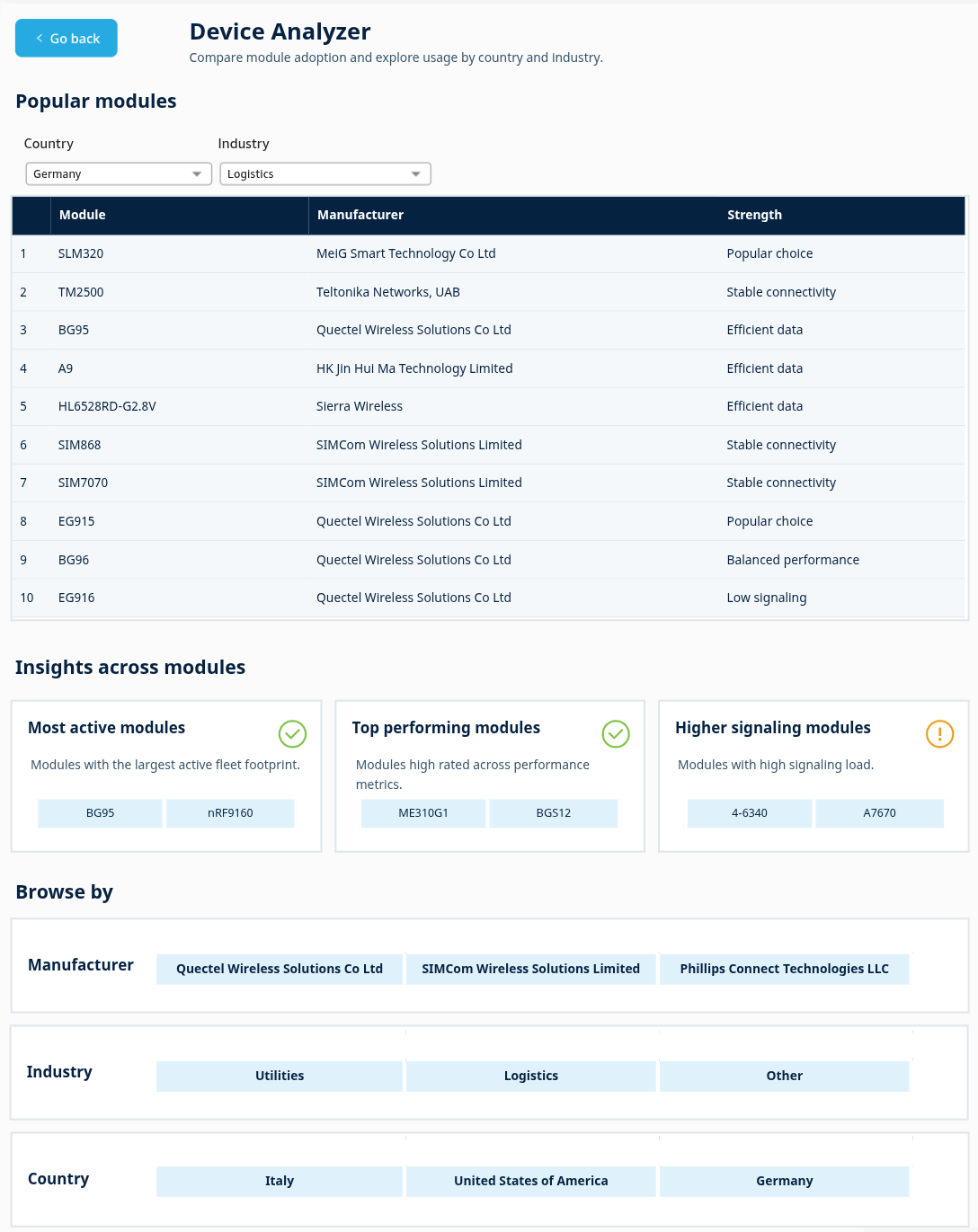
Popular modules
The table lists up to ten module models for the selected Country and Industry, with a rank, module name, manufacturer, and one Strength badge per module.
The table highlights modules with a large deployed-device footprint in the selected country and industry. Its deployment ranking is different from the customer-adoption Usage rank shown on a module profile.
Choose Country, then review the available Industry choices, which depend on that country. These selectors affect Popular modules only. They do not filter Insights across modules or Browse by. Select a module to open its module profile.
Strength badges
The performance badges use the categories shown in How this device performs. The other badges describe adoption. Each module shows only one badge, even if more than one description applies.
| Badge | What it tells you |
|---|---|
| Efficient data | Data efficiency is High on the module profile. |
| Stable connectivity | Connectivity stability is High on the module profile. |
| Stable sessions | Activation success, the profile's label for session stability, is High. |
| Low signaling | Signaling load is Average, the lowest displayed load category. This indicates lighter network-control activity. |
| Balanced performance | At least one performance category is Medium. Data efficiency, connectivity stability, and Activation success are not Average, and signaling load is not High. |
| Popular choice | The module is in the top 50 by customer-adoption rank. Customer adoption differs from deployed-device count. |
| Widely deployed | The module is in the top 50 by deployed-device rank. A large deployment can belong to relatively few customers. |
| Field-proven | The module has been used by 1NCE customers in real-world deployments. |
The badge does not summarize all four performance categories.
Insights across modules
Each card offers up to two module-name buttons. Select a name to open its profile. These cards use network-wide information independently of the Popular modules Country and Industry selectors.
Most active modules
This card lists modules with the largest deployed-device counts among models used by more than ten customers.
“Active” describes deployment footprint in this card. It does not mean that the modules generated traffic recently or that all deployed devices are currently online.
Top performing modules
This card lists widely deployed modules whose data efficiency, connectivity stability, and session stability are all rated above average.
Deployment size determines which modules appear among those meeting all three conditions. Signaling load is not part of this eligibility check.
Open the profile to inspect all four performance rows, including signaling.
Higher signaling modules
This card lists widely deployed modules with an above-average signaling-load rating. These modules generate relatively heavy network-control activity. This is a load warning, rather than a positive performance badge or proof of a fault.
Do not interpret “higher” as better connection quality.
Browse by
Browse by lists the most popular manufacturers, industries, and countries across the 1NCE network. Select a name to open its view.
Country view
Open this view by selecting a country. Its heading identifies the selected country. The tables explore manufacturer, module, and industry adoption associated with that country.
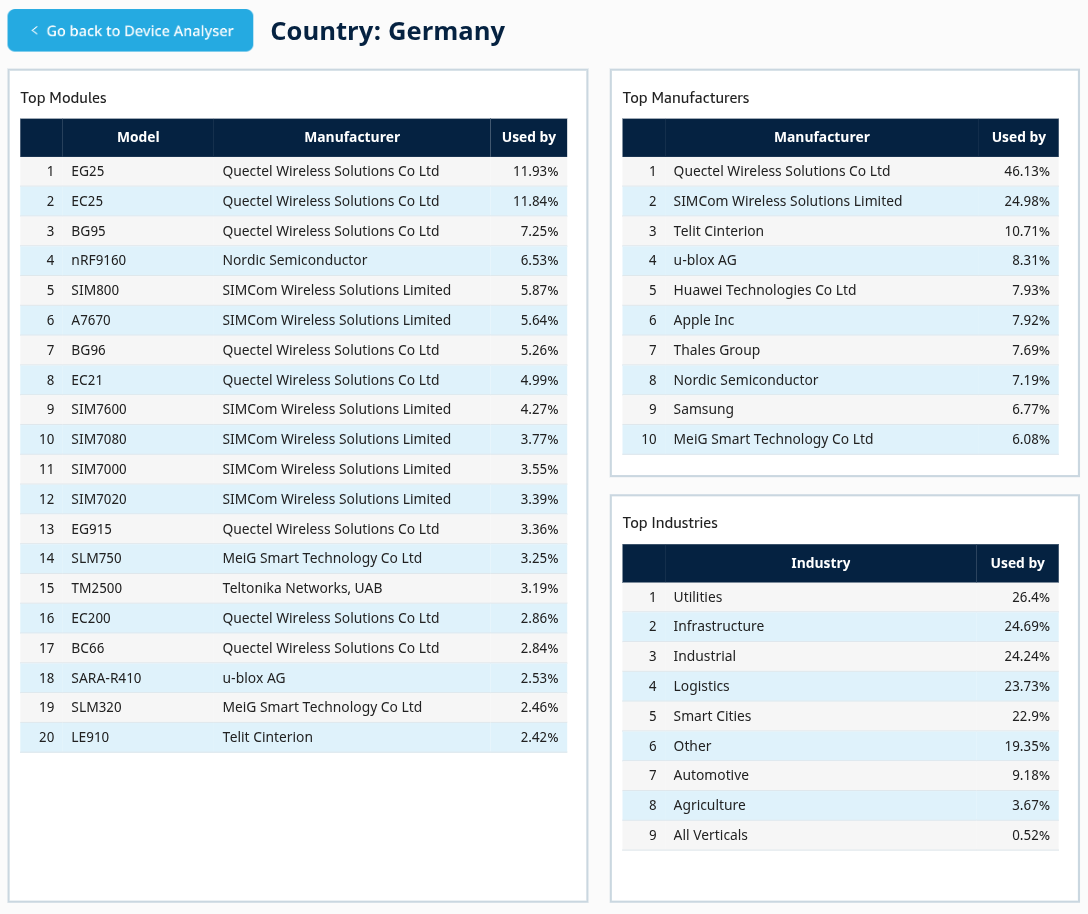
Top Manufacturers in a country
This table lists manufacturers with leading customer-adoption ranks for the selected country, with rank, name, and Used by percentage. The table includes customer-adoption ranks through ten.
Used by shows customer adoption for each manufacturer in the selected country.
Top Modules in a country
This table lists module models with leading customer-adoption ranks for the selected country, including model, manufacturer, and Used by percentage. Ranks through 20 are included. Ties can affect the number of displayed entries.
Used by shows customer adoption for each module in the selected country. It is not a traffic-volume share.
Compare the displayed adoption ranks, then select a module to inspect its profile. A high adoption position does not establish superior technical performance.
Top Industries in a country
This table lists industries associated with the selected country, with rank and Used by percentage.
Used by shows the reported adoption percentage for each industry in the selected country.
Compare the Used by percentages, then select an industry to open its view.
Industry view
The tables show associated manufacturers, modules, and countries.
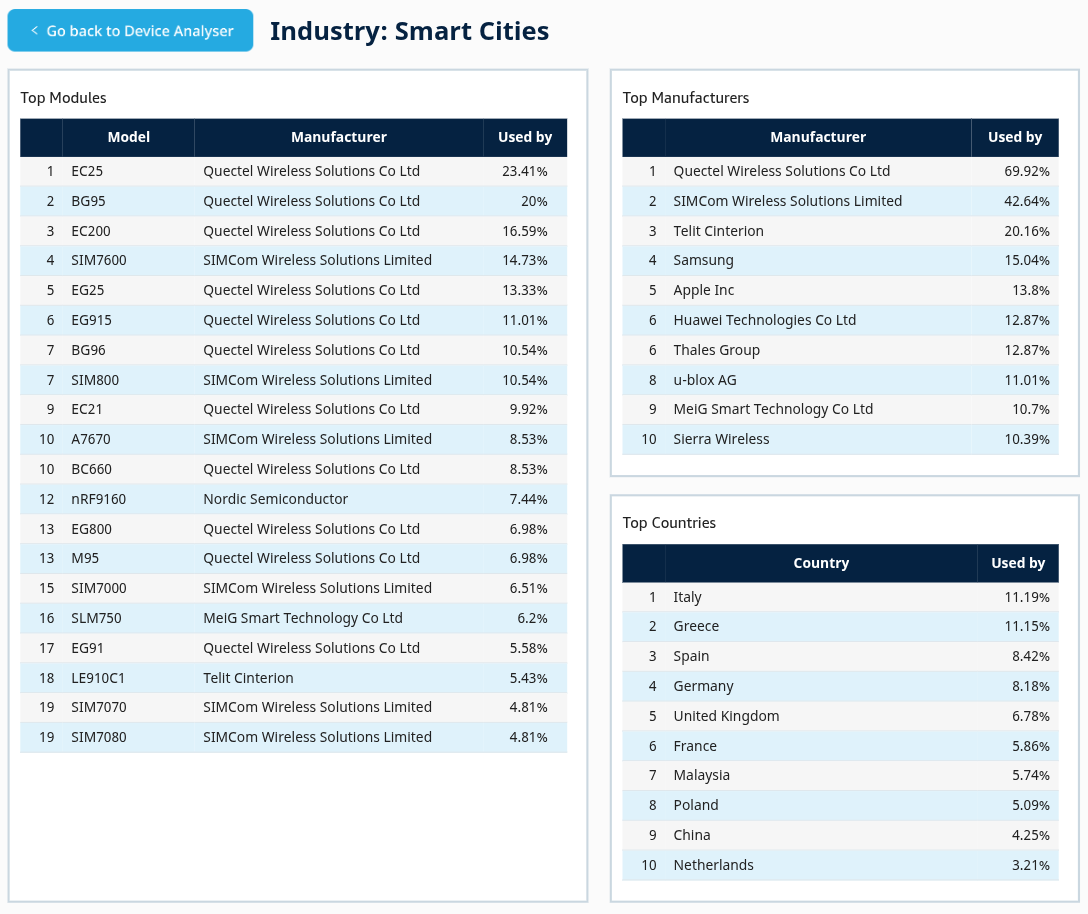
Top Manufacturers in an industry
This table lists manufacturers with customer-adoption ranks through ten for the selected industry, with their Used by percentages ordered from higher to lower.
Used by shows customer adoption for each manufacturer in the selected industry.
Top Modules in an industry
This table lists module models with customer-adoption ranks through 20 for the selected industry, with model, manufacturer, and Used by percentage.
Used by shows customer adoption for each module in the selected industry. It does not rank traffic volume or hardware performance.
Review the displayed percentages and select a module to open its profile. Use the profile's performance and hardware information to assess the module beyond adoption.
Top Countries in an industry
This table lists countries with leading adoption ranks for the selected industry, with rank and Used by percentage. Country ranks through ten are included, and the display is ordered by customer presence.
Used by shows the reported adoption percentage for each country in the selected industry.
Manufacturer view
Open this view by selecting a manufacturer. Its heading identifies the manufacturer whose models, industry presence, and country presence you are exploring.
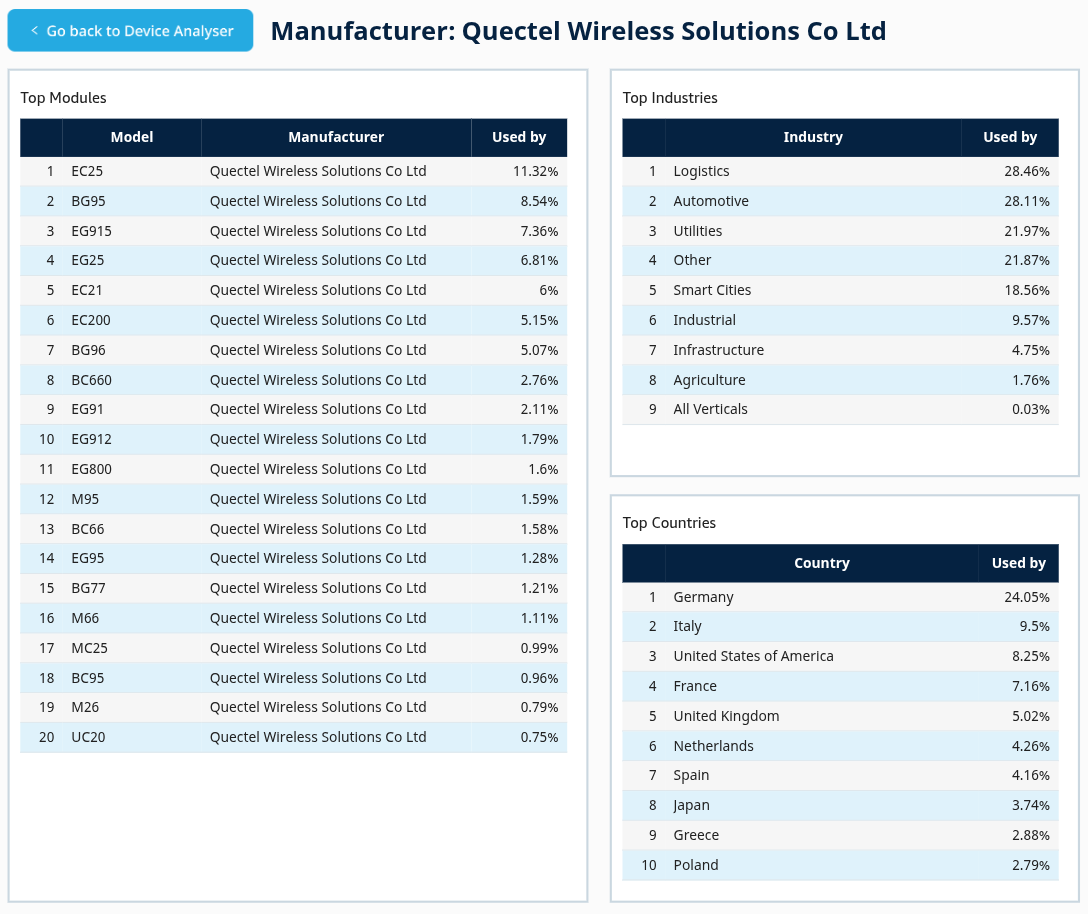
Top Modules from a manufacturer
This table lists up to 20 of the manufacturer's models, with adoption ranks and Used by percentages.
Used by is each model's overall customer-adoption percentage, with the displayed list restricted to this manufacturer's models. It is not a percentage of that manufacturer's devices.
Read the displayed rank alongside the percentage, then select a model for its profile.
Top Industries for a manufacturer
This table lists up to ten industries containing devices from the manufacturer, with rank and Used by percentage.
Here, Used by compares the manufacturer's devices in an industry with the manufacturer's overall device count. This is a device share, rather than a customer share.
Industries are selected by customer presence but ranked and displayed by device presence, so large installations can affect the result. Selecting an industry opens that industry's broader view. It does not keep the manufacturer restriction.
Top Countries for a manufacturer
This table lists up to ten countries with customers using the manufacturer, with rank and Used by percentage, ordered by customer count.
Here, Used by compares the manufacturer's customers in a country with the manufacturer's overall customer count. Unlike Top Industries beside it, this is a customer share.
Do not compare it directly with the adjacent device-based industry percentages. Selecting a country opens that country's broader view and removes the manufacturer restriction.
Module profile
You can open a module profile from Edge Lens, the Device Analyzer landing view, a country, industry, or manufacturer view, or the Similar modules list on another profile. The profile describes the selected module model, rather than an individual SIM, through adoption, performance, and hardware information. Use the report's return button to open the Device Analyzer landing view.
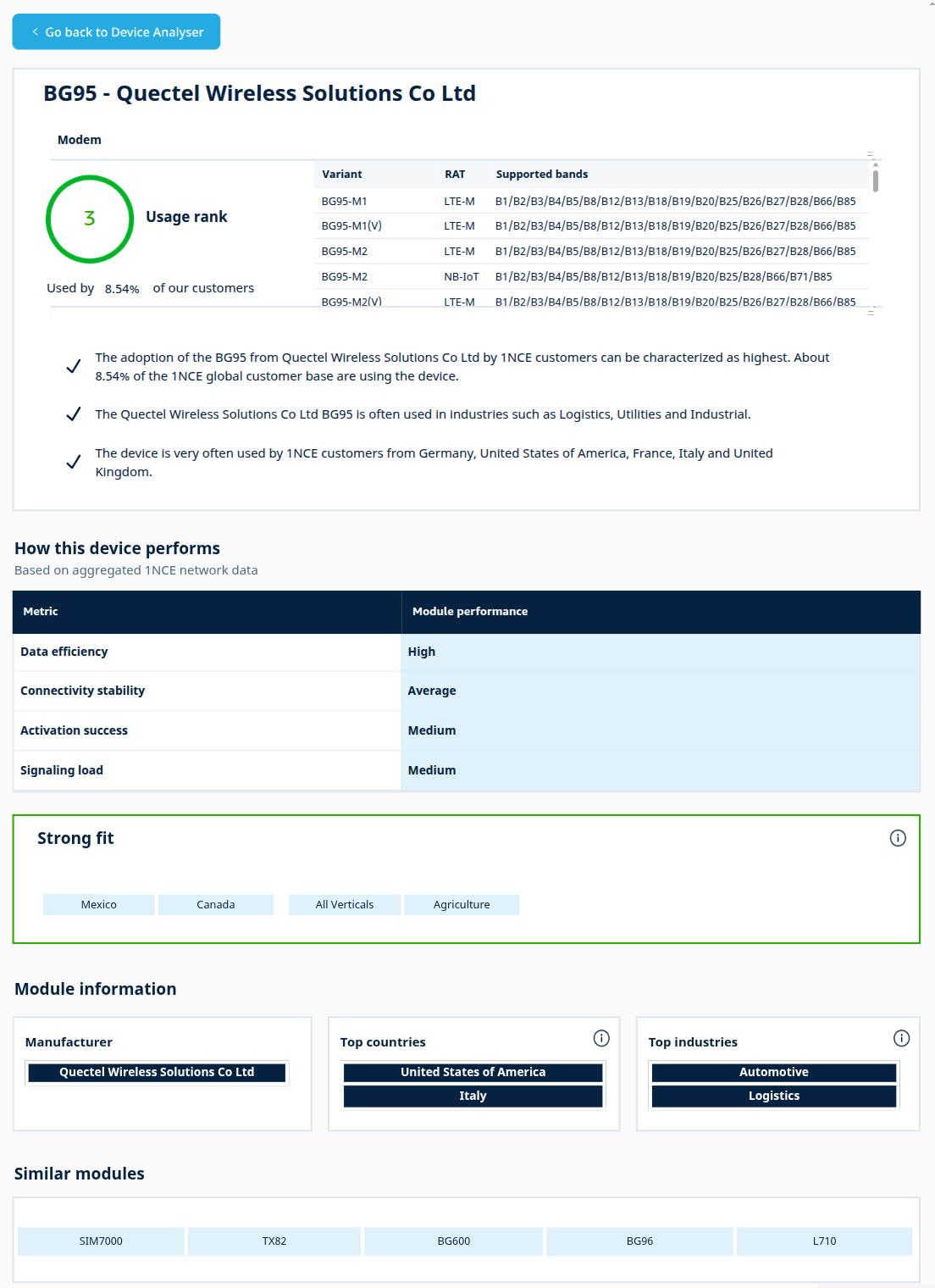
Usage rank
Usage rank is the module's customer-adoption rank.
A smaller rank number represents broader customer adoption. This differs from the deployed-device ranking used in Popular modules and does not rank traffic volume.
Used by our customers
This value shows the selected module's overall customer-adoption percentage. It describes customer adoption, rather than a share of individual devices or your own fleet.
A dash means the value is unavailable, while 0% is a displayed zero. A positive
share below 0.01% is shown as <0.01%. Other values are rounded to two decimal places.
Regional variants
This table lists the module's regional hardware variants, radio technologies, and supported frequency bands. RAT means radio access technology, the type of radio connection supported.
Different variants of the same model can support different radio technologies or bands.
Scroll through the list and check the exact variant for your target region and network. The table alone does not establish current operator certification or complete hardware compatibility. Verify those details with the manufacturer and intended operator.
Device insight statements
These statements summarize the selected module's adoption context, including customer adoption, industry adoption, and regional customer choice. They are not a prediction of how it will perform in your deployment.
If a statement says regional or industry information is unavailable, leave that question open rather than treating it as proof of no adoption.
How this device performs
Based on aggregated 1NCE network data, this table groups four module performance metrics into High, Medium, or Average. These are comparative categories, not the measured values. Average is the lowest displayed category, and Medium is the middle category.
| Metric | What the category describes |
|---|---|
| Data efficiency | How efficiently the module uses data. High indicates better efficiency, not higher data consumption. |
| Connectivity stability | How stable its data connections are. High indicates greater stability, not a guarantee for every connection. |
| Activation success | The report's label for session stability. High indicates a more favorable session-stability category, not a measured SIM-activation success percentage. |
| Signaling load | How much network-control activity the module generates. High means heavier load, not better connection quality. |
Strong fit
This section lists up to two country names and two industry names where the selected module has high customer-adoption shares.
These are adoption-based suggestions. They identify where the module has a strong customer presence. They do not predict radio performance or guarantee application fit.
Select a country or industry to explore its broader adoption view. Compare them with Module information below: Strong fit uses customer-adoption share, while Module information's top countries and industries use device counts.
Module information
| Component | Contents | Navigation and interpretation |
|---|---|---|
| Manufacturer | The manufacturer associated with this module. | Select its name to explore the manufacturer's broader catalogue. |
| Top countries | Up to two countries with the largest deployed-device counts for this module. | Select a country to explore its view. Large installations can influence these entries. They answer a different question from Strong fit. |
| Top industries | Up to two industries with the largest deployed-device counts for this module. | Select an industry to explore its view. Read these as deployment concentrations rather than customer-adoption percentages. |
Similar modules
This section lists up to five alternative module names, each opening the alternative's profile. These are the most widely deployed of the similar candidates.
Similar does not mean identical hardware, supported bands, performance, or commercial terms.
Select an alternative, check its name, and compare its device type, regional variants, bands, and performance ratings. Do not assume the first suggestion is the best replacement or that the list contains the five closest matches under a known scoring system.