Performance
Network health
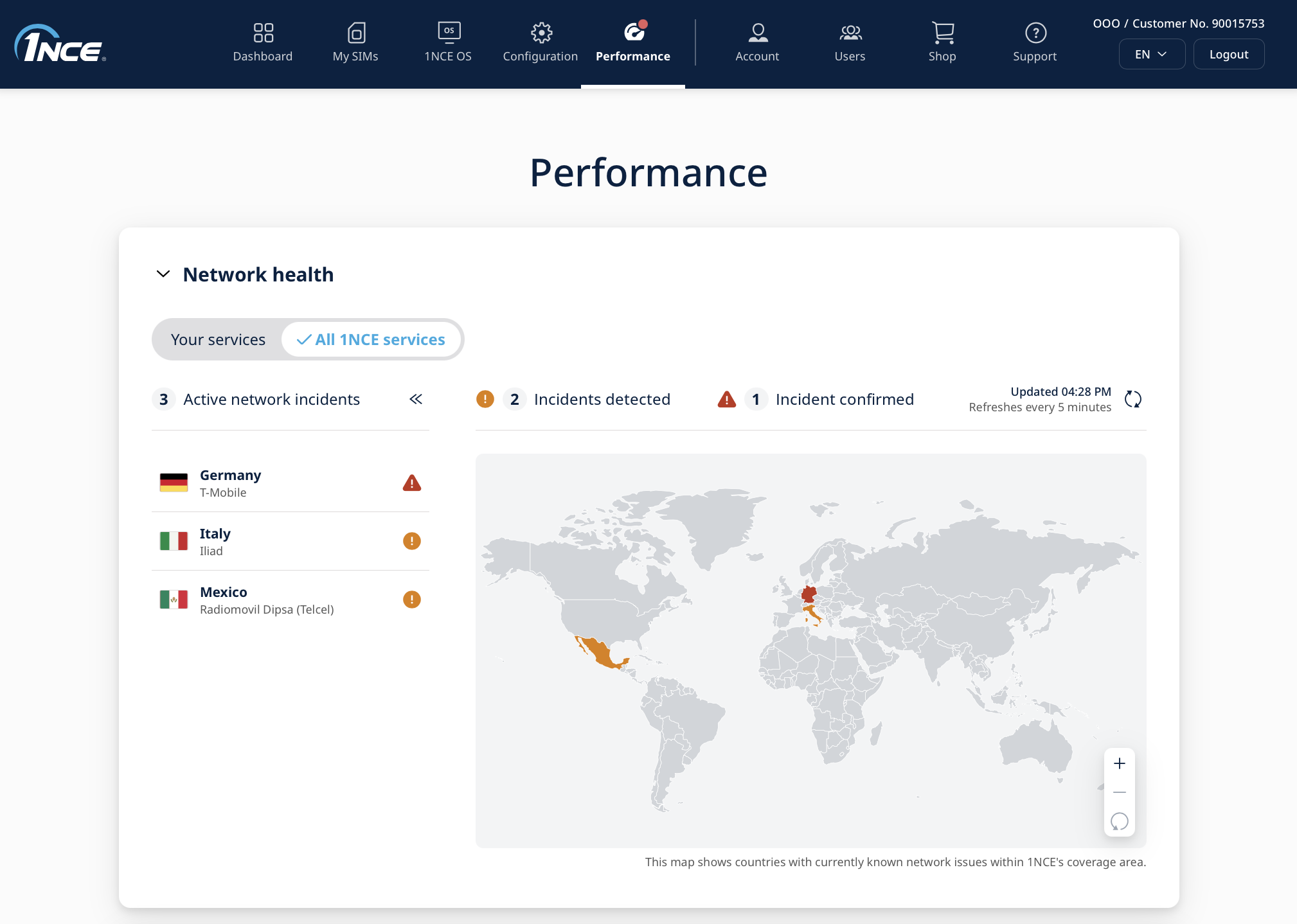
When a partner network has a problem, you no longer have to find out from your own devices. The "Network health" section on the Performance page shows known network issues in the 1NCE Portal, before you have to open a support ticket. It covers all 1NCE partner networks in 170+ countries, is monitored 24/7 and fully automated, and has under 1% false alarms.
Customers who have access to the Customer Portal on Platform 1.0 do not have access to Network health. For more details, see the Platform Migration pages and the Timeline.
| Element | What it means |
|---|---|
| Alert dot on the "Performance" menu icon | Turns orange or red as soon as an issue affects your SIMs, so you notice it without opening the page. |
| "Your services" / "All 1NCE services" | "Your services" shows only the networks that your own SIMs use. "All 1NCE services" shows every known network issue. |
| Active network incidents | A list of the country and network with an ongoing issue. |
| Incident detected | Orange. 1NCE has detected an issue on this network and is looking into it. |
| Incident confirmed | Red. The issue is confirmed and is being handled. |
| Map | Highlights the countries that currently have a known network issue. |
| "Updated" timestamp | The view refreshes itself every 5 minutes. |
This is the first version of Network health. If you have feedback, such as what you like, what you are missing (for example alerts by email or API) or anything that does not work as expected, please let us know through the "Support" tab.
Performance overview
The performance dashboard provides an insight into the key components and their current status of the 1NCE Services. In case of any incident, the status of the particular service will change accordingly. Customers can use this page to get a better understanding of a current incident and receive updates.
Below the overview, a list of recent incidents in the network with a detailed description is listed.

Support
Through the "Support" tab, 1NCE customers can quickly access documentation resources as well as technical support and customer service. On the page, links to the 1NCE Developer Hub, API Reference and a search integration for the documentation is given.

Technical support and customer service is provided either directly via phone or by placing a new service request ticket. The access to technical support is only available for existing customers. Customer service is provided either in German or English language. Telephone support is available from Monday to Friday from 9 a.m. to 6 p.m. (CET/CEST) (except for national public holidays). Tickets are mainly processed within the service hours.